Tuesday, July 5, 2016

Common Errors while configuring OIM Flat File GTC Connector

Recently, I was creating OIM Flat File GTC Connector and in the process of configuring it right faced some errors. There are some good sources on basic configuration steps already on web so not going to explain it again. For detailed steps check below blogs -

  • http://rite-oim.blogspot.com/2013/07/flat-file-reconciliation-oim-11g.html
  • http://www.iamidm.com/2012/09/oim-11g-r2-lab-3-flat-file-recon-to.html


Here are some of the issues I faced during configuration -

1. Flat File used for feeding must have first line as some comment instead of actual header attributes. For Ex:
# GTC Flat File Feed
login|firstname|lastname|eMail|organization
PDIAZ|Petric|Diaz|p.diaz@oracle.com|Xellerate Users

2. While creating mapping between Reconciliation Staging table and OIM table, select matching only checkbox for User Login Attribute.


3. Map the Role attribute to the "Code" that exist in the lookup "Lookup.Users.Role". For Ex: I was providing the "Employee" as the value for "Role" but in "Lookup.Users.Role" there is no code exists for "Employee" and code value is actually "EMP".


So, either use the codes that are already available or create new ones based on the requirement. If the code doesn't exist then you will see the error -
"Notes:ERROR: Given User Employee Type in the Column: RECON_USR_EMP_TYPE is Invalid" in the Reconciliation Event Management screen (System Configuration -> Scheduler -> Event Management -> Search Reconciliation Events).

4. If you see below errors in OIM server diagnostics logs -

Thor.API.Exceptions.tcAPIException: oracle.iam.reconciliation.exception.ReconciliationException: Invalid Profile - OIM_FLATFILE_RECON_GTC

Caused by: org.xml.sax.SAXParseException; cvc-minLength-valid: Value '' with length = '0' is not facet-valid with respect to minLength '1' 

for type 'matchingRuleType'.

It can come due to various reasons like recon profile or rules not created. Always regenerate the recon profile if you make any changes in the GTC connector config or mapping rules.

5. For below error in OIM server diagnostics logs -

MisfireHandler: Error handling misfires: Unexpected runtime exception: null OIM

See blog - http://yourhelperall.blogspot.com/2013/05/reconciliation-issue-misfirehandler.html


Monday, April 4, 2016

Challenge Parameters in OAM Authenitcation Scheme

Some of the common challenge Parameters used in OAM Authnetication Scheme are -  


  • ssoCookie - It is a good practice to mark all OAM cookie as Secure and Http-only. This can be done in individual authentication scheme. The exact OAM-11g-R1 syntax is "ssoCookie=Secure;httponly" in Challenge-Parameters field.

    • httponly - By marking the cookie as httpOnly, you are ensuring that the cookie can only be used for http protocol. It is not accessible via non-HTTP methods like JavaScript. Hackers can steal cookies via cross-site scripting if this setting is not in place.
    • secure - This configuration limit the cookie transmission thru the encrypted(https) channel only. This is an additional security on the top of httponly configuration

  • enablePersistentLogin= true - Required for persistent login feature in OAM 11g R2

  • overrideRetryLimit=1 - OverrideRetryLimit property that you define in the "Challenge Parameters" section in the authentication scheme associated with the application domain overrides DefaultRetryLimit. The Challenge Parameters had  the property:  OverrideRetryLimit =1 which led to the behaviour.

  • filterOAMAuthnCookie - For 11g WebGate, a user-defined parameter (filterOAMAuthnCookie (default true)) can be used to prevent the OAMAuthnCookie from being passed to downstream applications for security consideration. If you do want to pass the cookie on, then set the filterOAMAuthnCookie parameter to false.


Monday, February 22, 2016

Using JavaScript in ADF - Part I

I would like share my experience on using Javascript in ADF. I have seen many times developer makes some common mistake while using Javascript with ADF without properly understanding it. At the time of development, may be all look good in terms of functionality but sometimes it introduces performance and maintenance issues. ADF Faces is an Ajax-enabled rich JavaServer Faces component framework that uses JavaScript to render client-side components, implement rich component functionality, validate user input and convert user data input. ADF exposes public javascript APIs which developer can use instead of directly doing DOM manipulation. DOM manipulation is something which developer should not start with before looking all other options provided by ADF public Javascript APIs.

In ADF, The majority of the UI components are rendered in HTML, that is generated on the server side for the request.  Every ADF UI component is represented by two types of javascript classes - a public component object and an internal peer object. The public objects is used by the developers when programming on the ADF Faces client side. Peer objects help in rendering logic and hide the browser specific DOM implementation code. For every ADF UI component object, there will be the corresponding object in server. But, it's not necessary always to have a ADF javascript object on the client side, we will go in detail on this later.

JS is all about functions and objects. Even functions are objects in JS and you can assign properties to the functions as you do for objects. JS has first-class functions meaning it supports passing functions as arguments to other functions, returning them as the values from other functions, and assigning them to variables. JS supports prototypal inheritance which is different than classical inheritance. Each ADF UI component has a corresponding JS object  and has a root object as AdfObject. Each ADF UI JS object follow the name convention and prefix by "Adf" and the corresponding server component doesn't have the prefix. For Ex: AdfRichPopup

Client Side JS Object Heirarchy


Server Side Java Class Heirarchy


Public methods that are exposed by the component JS object can be used to manipulate the component properties and do operations. For most of the action listeners and events both server side and client side operations exists but it may not be the case everytime. For Ex: To show, hide and cancel a popup both server and client side operation exist. The popupOpening is a client only event that can be canceled. If this event is canceled in a client-side listener, the popup will not be shown. The PopupFetchEvent is one of two server-side popup events but doesn't have a corresponding client event. The custom client event listeners can invoke JavaScript that raises a CustomEvent that is handled by a af:serverListener. See the Javadocs - http://docs.oracle.com/cd/E21764_01/apirefs.1111/e10684/oracle/adf/view/rich/component/rich/RichPopup.html for details.

Enough theory, let's see some examples where we can apply these concepts -  

1. Never use ADF Internal JavaScript objects 
JS doesn't have any package structures like Java classes. Based on the hierarchical object  structure it create package like structure to access the object. ADF Faces  make these things simple by applying the naming conventions and make it look like Java so it's easy to understand. In ADF Faces, two package structures are used: oracle.adf.view.js and oracle.adfinternal.view.js. The oracle.adfinternal.view.js package contains those JavaScript objects that should only be used internally by the ADF Faces component framework. I have seen many times developers using internal packages and then blaming the framework later when it doesn't work when you migrate to new releases or if some patches applied. Changes to internal packages are applied without any notice.

For Ex: AdfPanelStretchLayout


Internal JS Object


 2. Finding ADF Component on the Client 

I have seen many times developers using JQuery/JS to find the ADF component by id in the DOM by looking at the generated HTML For Ex: document.getElementById("itemId"). This is not the correct approach because the HTML generated may change based on the ADF UI component implementation.

As I mentioned before, the component hierarchy on the server is same as the hierarchy of ADF Faces components on the client. But, it's not necessary to have the client object for every ADF Faces component but will have the server side generated html. To make sure, client object exist there are two ways to do that -

  • By setting clientComponent=true property on UI Component declaratively using property inspector
  • If the UI component has af:clientListener attached to it then automatically it client object is generated

After making sure ADF client object exist, move on to find the component by Id using ADF Javascript objects. AdfPage.PAGE object exposes three methods to find the component -
  • findComponent
  • findComponentByAbsoluteId
  • findComponentByAbsoluteLocator
Check this blog for details on finding component by Id - https://blogs.oracle.com/groundside/entry/pattern_for_obtaining_adf_component

Reference - http://www.oracle.com/technetwork/developer-tools/jdev/1-2011-javascript-302460.pdf


Wednesday, January 20, 2016

SSO : IBM Tivoli Access Manager(TAM) and Weblogic Server

This post is about configuring Weblogic server to assert the authentication information sent by IBM Security Access Manager(TAM) in HTTP Header. TAM is equivalent of OAM(Oracle Access Manager).
Configuration is the two step process as any other SSO solution -

1. Configure the Asserter that asserts the HTTP header token populated by the access manager
2. Configure the Authenticator that establishes the authenticated Subject in the container. Also, populate the prinicipals/groups for the authenticated Subject.

TAM can be configured to send authentication information to WLS in an HTTP header. TAM can populate two types of encrypted tokens in HTTP header -

iv-user - Contains only the authenticated userID
iv-creds - Contains the authenticated userID and the associated groups

IBM provides a Security Provider jar which includes both Identity Asserter and Authenticator to read the encrypted tokens and assert the user. Download the jar from link. This jar needs to copied to <WL_SERVER_HOME>/server/lib/mbeantypes. For more details on configuring security provider refer Oracle Document.

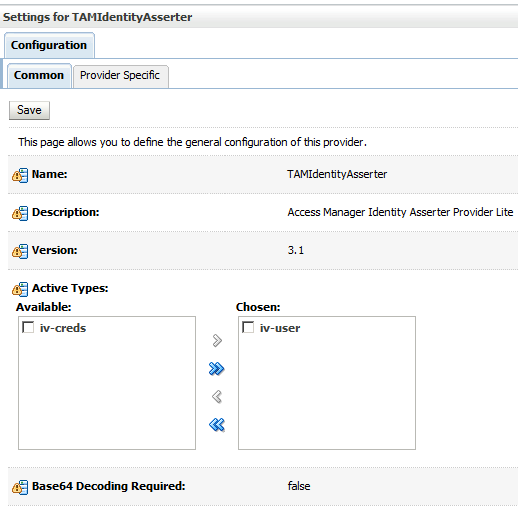
Configuring TAMIdentityAsserter and selecting iv-user token.


List and order of configured Security providers -

Thursday, June 11, 2015

SSL Hostname verification in Weblogic Server

While accessing any webservice on SSL, if you get the below error in the logs - 

<Notice> <StdErr> <BEA-000000> <javax.xml.ws.WebServiceException: Failed to access the WSDL at: https://<Host-Name>:<Port>/<Webservice Endpoint>?wsdl. It failed with: [Security:090504]Certificate chain received from <Host-Name>.<Domain-Name> failed hostname verification check. Certificate contained *.<Domain Name> but check expected  <Host-Name>.<Domain-Name>


To Resolve this follow the below steps to disable the host name verification in WLS –

  1. If you have not already done so, in the Change Center of the Administration Console, click Lock & Edit (see Use the Change Center).
  2. In the left pane of the Console, expand Environment and select Servers.
  3. Click the name of the server for which you want to disable host name verification.
  4. Select Configuration > SSL , and click Advanced at the bottom of the page.
  5. Set the Hostname Verification field to None.
  6. Click Save.
  7. To activate these changes, in the Change Center of the Administration Console, click Activate Changes.
    Not all changes take effect immediately—some require a restart (see Use the Change Center).
Note: This is not recommended for Production Environment.

Saturday, February 28, 2015

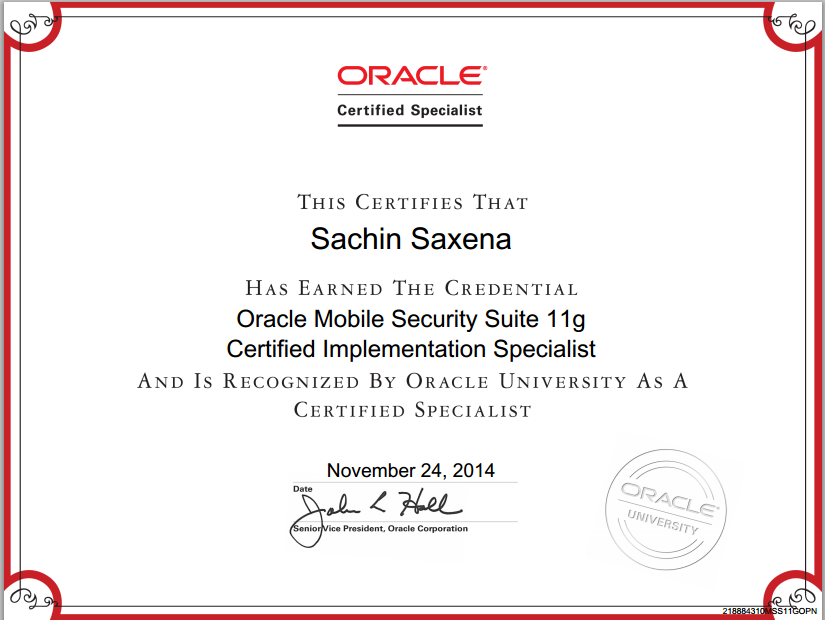
Passed Oracle Mobile Security Suite 11g Essentials Exam

I am glad to share that I passed the Oracle Mobile Security Suite(OMSS) 11g Essentials Exam. OMSS leverages the technology acquired from the acquisition of Bitzer Mobile. It's a new Mobile Application Management(MAM) solution that comes with many cool features like App Containerization and simplify enterprise mobility. This is going to address BYOD(Bring your own device) initiative that many corporate started following and many more to join.


When I started preparing for exam, I didn't find much documentation other than the Oracle documents. To pass in the exam, just going through the Oracle documentation is enough. Most of the questions are straight forward and directly from the documents. Unlike Oracle other exams, none of the questions asked based on real implementation experience.

Some Useful Links -

OMSS Documentation - http://docs.oracle.com/cd/E52357_01/index.htm
Oracle Webcast - http://medianetwork.oracle.com/video/player/3442504861001
Blogs - http://ptotech.blogspot.com/2014/05/oracle-mobile-and-security-suite-omss.html

Sunday, February 8, 2015

Weblogic Security Exception : Invalid Subject Principals

If you are seeing "Caused by: java.lang.SecurityException: [Security:090398]Invalid Subject: principals" error in weblogic server logs on RMI invocation of EJB(deployed on different Weblogic domain), this means the issue is in domain trust security settings.

Stack trace


Caused by: java.lang.SecurityException: [Security:090398]Invalid Subject: principals
at weblogic.security.service.SecurityServiceManager.seal(SecurityServiceManager.java:833)
at weblogic.security.service.SecurityServiceManager.getSealedSubjectFromWire(SecurityServiceManager.java:522)
at weblogic.rjvm.MsgAbbrevInputStream.getSubject(MsgAbbrevInputStream.java:352)
at weblogic.rmi.internal.BasicServerRef.acceptRequest(BasicServerRef.java:953)
at weblogic.rmi.internal.BasicServerRef.dispatch(BasicServerRef.java:351)

To solve the above issues, enable trust between multiple Weblogic Server Domains and specify same credential in both the weblogic server domains. It can be fixed by -

  • Enabling Cross Domain Security between Weblogic Server Domains
  • Enabling Global Trust

I fixed it by enabling global trust between the weblogic server domains. By default, domain credentials are randomly generated and no two domains will have the same Domain credential. So, replace the generated credential and specify the same domain credential for each of the domains. In this way, identity is passed between WLS domains over an RMI connection without requiring authentication in the second domain.

Note: Don't confuse Domain credential with the credential for login to WLS console


Configuration Steps 


1. Log in to WLS console and click on Lock and Edit (top left pane)


2. In the left pane click on Domain name.


3. Select Security > General on the center pane. Click Advanced link.


4. Enter password in Credential and Confirm Credential fields.


5. Click on Activate Changes in the top left pane.